
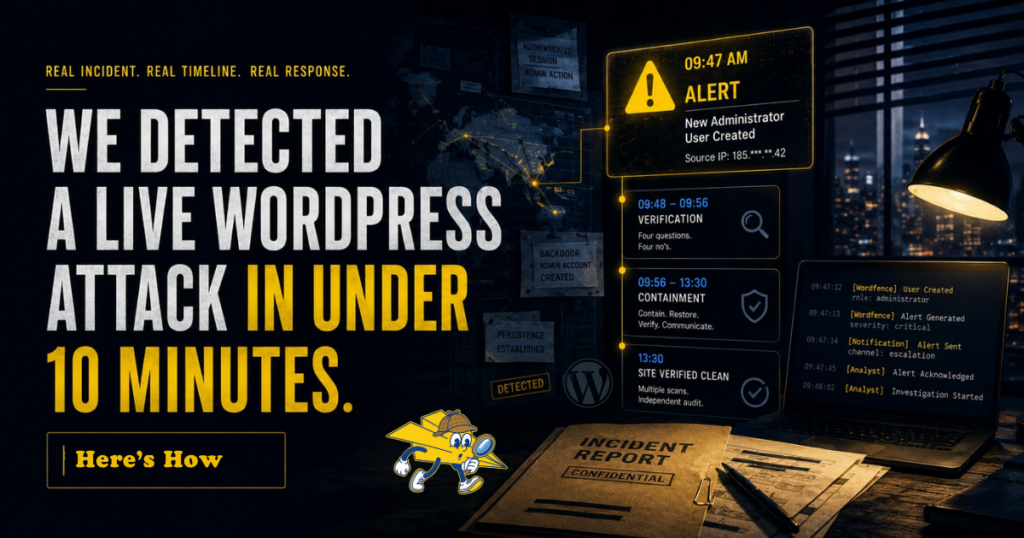
We Detected a Live WordPress Attack in Under 10 Minutes. Here’s How.
A real incident, as told by Sendy, our paper airplane mascot. Names, identifying details, and the specific timing have been changed to protect the site and the people who run it. The architecture, the monitoring stack, and the response are exactly as they happened.
The call came in at 9:47 AM on a Tuesday. (It was a support ticket).
I’d love to tell you it was raining. It wasn’t. It was a perfectly ordinary morning in a perfectly ordinary inbox, and somewhere inside a perfectly ordinary WordPress site belonging to a financial institution we manage, somebody who didn’t belong there was making themselves an administrator.
By 9:56 we had verification, containment underway, and the first message out to the client’s IT lead. The site was rolled back to a verified clean state inside four hours. An independent third-party audit closed the incident later that week.
Nine minutes from alert to action. Four hours from breach to clean. That’s the case. The rest of this post is how it actually played out, what the monitoring caught that nothing else would have, and why most WordPress sites would have noticed this attack sometime between Friday afternoon and never.
09:47, the alert
Here’s a thing about a determined attacker inside an authenticated admin session. They look exactly like a legitimate admin.
The perimeter doesn’t catch them, because by the time they’re doing damage they’re already past it. The login page doesn’t catch them, because they’re not logging in anymore. The brute-force lockout doesn’t catch them, because they’re not guessing passwords. Whatever credential got them in, got them in upstream of every defense designed to stop people at the door.
What they have to do, if they want to keep their access after their first credential gets rotated, is create a backdoor account. A new admin user. A username that looks plausible, an email that looks plausible, full administrator privileges, ready to slip back in when nobody’s looking.
Wordfence fired the alert the moment the new admin was created. Not when somebody tried to log in. Not when a file changed. When the user creation event itself ran inside WordPress.
That distinction is the whole post. Detection isn’t a magic property of “having security.” Detection is whether the monitoring is watching the right event.
09:48 to 09:56, verification
The verification path was short, because the work had been done before the incident, not during it.
Four questions, each one answerable from records we already had:
Is the named admin who would normally create user accounts online right now? No.
Does the source IP of the session match any IP on the team’s approved allowlist? No.
Does the new account’s username match any naming convention used on this site? No.
Does the new account’s email domain match the organization? No.
Four no’s, four minutes apart. By 9:56 the answer was clear and the response was already moving.
Most incident response time isn’t spent detecting. It’s spent verifying. And most verification time isn’t spent finding answers, it’s spent figuring out where to look. The verification we ran here took minutes because we’d already done the work of knowing where the answers lived. On a site without that prep, the same four questions would have taken hours, and by then the attacker would have done whatever they came to do.
09:56 to 13:30, containment
Containment, in order:
All admin passwords reset. Active sessions forcibly expired. Plugin and theme files checked for modifications. The unauthorized user removed. Site rolled back to a verified clean restore point taken before the suspicious activity began. CDN cache purged so no edge-cached version of any compromised page would keep serving stale.
Then the part that matters more than people think: independent verification scans from multiple tools, run from multiple geographies, before anyone said the word “clean.”
The rollback decision deserves a sentence on its own. We chose to roll back rather than surgically remove the changes. The trade-off there is forensic visibility for absolute certainty. You lose the ability to study exactly what the attacker did. You gain the certainty that the rolled-back state is provably clean. For a financial institution’s customer-facing site, certainty wins every time.
By 13:30 the site was verified clean. The first message had gone out to the client’s IT lead more than three hours earlier, and they’d been kept current the entire time.
What “detection in 10 minutes” actually requires
Three things, all working at the same time. Most WordPress security setups have one. Some have two. Almost none have all three.
The right events being watched. Most monitoring tools alert on failed login attempts, file integrity changes, and known malware signatures. Useful, but useless against an authenticated attacker doing admin things. Wordfence’s premium tier monitors user creation, plugin installation, theme edits, and other admin-behavior events that an attacker inside a valid session has to perform if they want to maintain access. Those are the events worth alerting on.
A routing path that lands in front of a human. Real-time alerts are only useful if they end up where someone will see them within minutes. Alerts that pile into a shared inbox don’t get answered at 9:47 AM. Our internal escalation pipes critical events into a parallel notification channel that overrides do-not-disturb, separate from the general ticketing inbox. General inbox is for everything else.
A human who can verify and act. Verification has to be fast, which means the answers have to be knowable from existing records, not hunted down mid-incident. The four-question check above took minutes because we’d already done the work of knowing where the records lived. On a site without that prep, the same questions take hours.
The combination of those three is what makes 10-minute detection real instead of theoretical.
Why network-level security alone didn’t catch this
This is the most common confusion in WordPress security, and Sendy’s going to fly straight through it.
There are two layers of monitoring on a properly defended WordPress site. They catch different things on purpose.
Perimeter security sits at the network edge. Hosting platforms with edge protection (WP Engine’s Global Edge Security, Cloudflare’s WAF, similar tools) inspect inbound traffic for known attack patterns before requests ever reach WordPress. They block DDoS. They block known SQL injection signatures. They block traffic from known malicious IPs. Perimeter security is the front gate. It blocks 99%+ of attacks based on known patterns.
Endpoint security runs inside WordPress itself. Wordfence and similar tools monitor user actions, file changes, database state, admin behaviors. They see what happens after a request is already past the perimeter, regardless of how it got there.
These two layers don’t replace each other. Perimeter security doesn’t see what’s happening inside WordPress, because by design it stops looking once it decides a request is legitimate. Endpoint security doesn’t see external traffic patterns, because by design it only operates after a request has been processed. Together they create a system where threats have to bypass two independent defenses, each blind to the other’s signals.
The incident above is the textbook case for why the endpoint layer is non-negotiable. The attacker was already authenticated. Whatever credential compromise got them there happened somewhere upstream, probably phishing, possibly a reused password from a third-party breach. The session they were using looked legitimate to the perimeter. The only signal they couldn’t hide was the admin action itself.
If the only monitoring on the site had been at the perimeter, the attacker would have had time to do whatever they wanted before anyone noticed. The endpoint layer is what made the difference between a 10-minute detection and a multi-day forensic recovery.
What we monitor, and why
The events worth alerting on are the ones an attacker inside an authenticated session has to perform if they want to do anything meaningful. The short list:
User creation, especially admin user creation. This is what fired in the case above. An attacker who wants persistent access creates a backdoor account. Even if their primary credential gets revoked, the backdoor account stays.
Plugin installation and activation. Installing a malicious plugin is one of the cleanest ways to put a backdoor on a WordPress site. The plugin file lives in the WordPress filesystem, runs on every page load, and looks legitimate to anyone not specifically auditing the plugin list.
Theme file modification. Editing functions.php to inject code is an older move but still common. WordPress allows it from the admin dashboard by default unless DISALLOW_FILE_EDIT is set in wp-config.php. It is, on every site we manage at this tier.
Database changes outside normal write patterns. Cron jobs being added or modified. Unexpected entries in the options table. New rows in user meta that don’t match the normal user lifecycle.
File integrity changes in core, theme, and plugin directories. WordPress core files should not change between releases. Theme and plugin files should only change on update. Anything else is signal.
Login behavior anomalies. Successful logins from unusual locations or unusual times. Logins immediately followed by privilege escalation. Sessions that switch IP mid-stream. None of these always indicate compromise, but each one justifies a closer look.
The principle behind the list: detection is only as good as the events it watches. If the only thing being monitored is failed logins, an authenticated attacker is invisible. The monitoring has to match the threat model. For WordPress, that means watching the things an attacker has to do once they’re inside, not just the things they do to get in.
The mistake that kills a monitoring system
There’s a failure mode in this kind of monitoring that’s worth naming, because it’s the most common reason real-time alerting stops working overtime.
Alert fatigue.
A monitoring system that fires too many alerts gets ignored. If every plugin update, every successful admin login, every routine cache flush triggers a notification, the actual threat-signal alerts get lost in the noise. Within a week, nobody is looking at the alerts. Within a month, the system is functionally not running even though it’s technically active.
The discipline is to alert on events that require human judgment within minutes, and to leave everything else for batch review in the daily or weekly log. Wordfence’s Standard Scan setting, tuned after the initial audit period, is calibrated for this. It surfaces real threats. It does not surface every theme file update from a routine plugin release.
The same principle applies to the escalation path. Critical events route to the channel that overrides do-not-disturb. Routine events route to the regular ticketing queue. Mixing the two means the routine eventually drowns the critical.
This is harder than it sounds. Every monitoring system ships with sensible defaults and gets tuned upward by site owners who want “more visibility.” More visibility is not more security. Sharper visibility is.
What happens after detection
Catching the attack in 10 minutes is the necessary first step. It’s not the whole job. The next decisions are containment scope, communication cadence, root cause analysis, and verification before close. Each one has its own failure modes, and any one of them can turn a contained incident into a multi-week recovery if it’s handled wrong.
The most important of those, the one that determines whether the incident really ends or just appears to, is verification.
One scan from one tool reporting clean is not verification. It’s one data point. And on a different client site, on a different week, a standard cleanup got reported “complete” and third-party scanners were still flagging the site. That’s the case we’ll cover next: why a standard WordPress malware cleanup is often not enough, what “pre-WordPress execution” means and why standard scans miss it, and what verified clean actually looks like.
Until then.
Sendy out. ✈️
Frequently Asked Questions
How fast can a WordPress hack be detected?
With the right monitoring stack, detection times of 5 to 10 minutes from the initial alert to human verification are achievable. The actual number depends on three things: alerting on the right events (admin user creation, plugin installation, file modification, not just failed logins), routing alerts to a channel where a human will see them within minutes, and having a verification protocol that can be run quickly against existing records. Most WordPress sites have at most one of the three.
What’s the difference between Wordfence and Cloudflare for WordPress security?
They operate at different layers and catch different things. Cloudflare and similar network-edge tools sit in front of the site and block inbound traffic based on known attack patterns. Wordfence operates inside WordPress and monitors what happens after a request is already past the perimeter: user creation, plugin installation, file changes, admin behaviors. Neither replaces the other. A serious WordPress site needs both.
Why isn’t a hosting firewall enough?
A hosting WAF (web application firewall) is excellent at blocking known attack patterns at the network edge. What it cannot see is an authenticated session doing something it shouldn’t. If an attacker has valid credentials, whether from phishing, a credential leak, or a compromised employee device, the WAF will let them in because the request looks legitimate. Endpoint monitoring inside WordPress is what catches them once they’re in.
Should every plugin install trigger a security alert?
Yes, on a high-stakes site. Plugin installation is one of the cleanest ways an attacker establishes persistence on a compromised WordPress site, so any new plugin appearing on the site is signal. On sites we manage, plugin installation outside the normal deployment process triggers an immediate alert. The rare false positive (a legitimate emergency install) is worth the consistent visibility.
What does “verified clean” mean after a WordPress incident?
It means more than one tool reporting clean. Real verification requires multiple independent scans (different vendors, ideally from different geographies), file-level verification that no theme or plugin files have been modified, database verification that no malware or spam content has been injected, no suspicious users, no unexpected cron jobs, and an independent third-party audit from a vendor different from the one that performed the cleanup. A site that has only ever been verified clean by its own monitoring tool has not really been verified clean.
This is part two of a series on running WordPress like enterprise infrastructure. If your site is more important than your current security setup reflects, book a free 30-minute strategy session. No pitch. Just clarity on what’s actually protecting you and what isn’t.
Part one: The Six-Layer WordPress Security Model for Sites That Matter

Rob Odell
Rob's marketing career spans over a decade, evolving from mastering the intricacies of paid ads and SEO to architecting full-scale growth strategies as a Chief Marketing Officer. Known for his strategic acumen and direct approach, Rob excels in synthesizing insights from his diverse experiences to craft growth plans that drive businesses forward. He is driven by his commitment to perpetual learning and generating tangible results. Connect with him on LinkedIn
Comments are closed.